I’ve been hunched over a desk for over a decade, and after my back injury in 2012, I had to get serious about standing desks. But here’s the thing: you don’t automatically need a $1,200 electric desk. Sometimes a $200 converter does the job just fine. The question is figuring out which one fits your situation.
Let me be clear about something: standing all day is not better than sitting all day. I learned this the hard way after spending my first week with a standing setup on my feet for 6+ hours straight. The research backs this up — alternating between sitting and standing is what actually reduces back pain and improves energy levels. I aim for a 3:1 ratio now: 45 minutes sitting, 15 minutes standing per hour. That seems to be the sweet spot for my lower back.
Full Electric Standing Desks
Electric sit-stand desks replace your entire desk and move the whole surface up and down. Based on specs, independent reviews, and user reports, they’re the cleanest solution if you can swing the cost and setup.
Pros: Clean setup, full desk space at any height, programmable presets
Cons: Expensive ($400-$1500+), requires assembly, takes up same footprint
Best for: People setting up a new workspace from scratch
The main advantage with a full electric desk is stability. When typing at standing height, there’s zero wobble. The programmable presets are also nice — ergonomic guidelines for someone around 6’1″ put sitting height around 29–30 inches and standing height around 42–43 inches. The transition on quality models takes about 15 seconds, which is smooth enough that you’ll actually use it.
Sit-Stand Converters
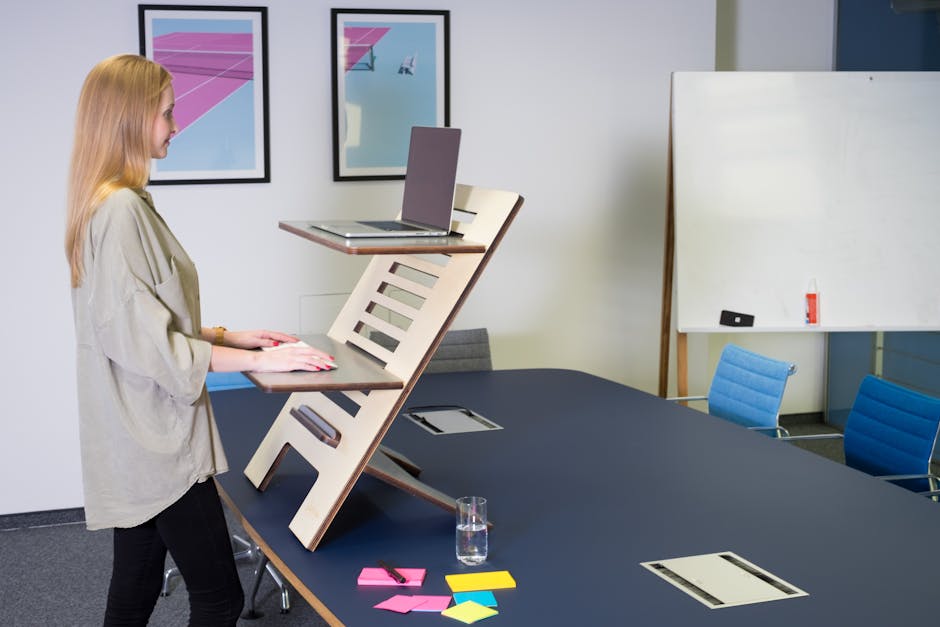
Converters sit on top of your existing desk and lift your monitor and keyboard to standing height. This is where I started, and honestly, it’s where most people should start too.
Pros: Affordable ($150-$400), no assembly, keeps your current desk
Cons: Less stable, takes up desk space, limited surface area when raised
Best for: People who want to try standing without replacing their desk
The stability issue is real but not a deal-breaker for most work. I used a converter for about 18 months before upgrading to a full desk. There’s some minor wobble when typing, but it didn’t interfere with my work. The bigger limitation is desk space — a good converter takes up roughly 35 inches by 22 inches of your surface area.
What I’d Buy Today
If I were setting up a new workspace from scratch, I’d go electric. The FlexiSpot E7 and Uplift V2 are the two I’d recommend based on build quality, warranty, and what independent reviews and long-term users consistently report.
But if I already had a desk I liked, or if I wasn’t sure whether standing would help my back, I’d start with a converter. The VariDesk Pro Plus is the converter I’d point people toward first. It’s built better than most of the cheaper options, and user reviews consistently back that up.
Products Mentioned in This Article
As an Amazon Associate, I earn from qualifying purchases. These links help support the site at no extra cost to you.
How often should I actually switch between sitting and standing at my desk?
The research shows that alternating between sitting and standing is more beneficial than standing all day. I aim for a 3:1 ratio — about 45 minutes sitting, then 15 minutes standing per hour. This pattern helps reduce back pain and improve energy levels without causing fatigue from standing too long. I set a timer on my phone until it became habit.
Can a sit-stand converter really provide the same benefits as a full standing desk?
Yes, converters can provide the same health benefits as full standing desks since both allow you to alternate positions throughout the day. The physiological benefits are identical. Converters have limitations like less stability, reduced desk space, and smaller surface area when raised, but they’re perfect for testing standing work before committing to a full desk replacement.
What’s the main downside of using a converter instead of a full standing desk?
The biggest drawbacks are stability and space. Converters are less stable than full desks — you’ll feel some wobble when typing. They also take up valuable desk real estate and provide limited surface area when raised. That said, they cost significantly less ($150-$400 vs $400-$1500+) and don’t require assembly or replacing your existing desk.
Is it worth spending more on an electric standing desk if I’m just starting to address my back pain?
If you’re setting up a completely new workspace, an electric standing desk offers the best long-term solution with programmable presets and full desk functionality. But if you want to test whether standing helps your back pain first, a converter is a smart, affordable way to try it without a major investment. That’s exactly what I did.
Do I need to assemble a sit-stand converter, or is it ready to use?
Converters typically require minimal to no assembly and can be used immediately after unboxing. This is one of their main advantages over full electric standing desks, which require significant assembly time and setup. You simply place the converter on your existing desk and start using it. Most take under 10 minutes to set up.