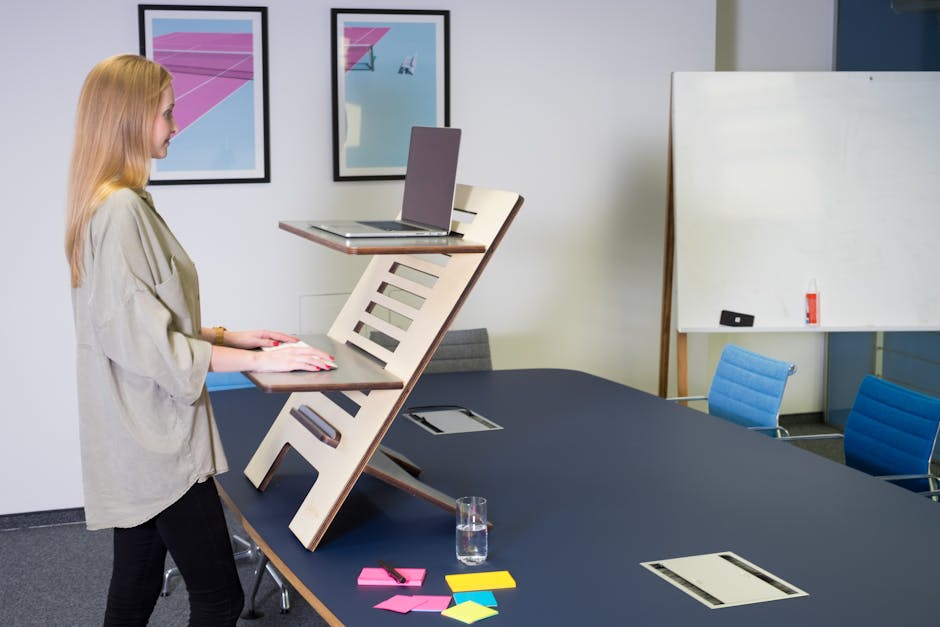
Three hours straight at your desk, and that familiar ache is starting in your lower back. I’ve been there more times than I can count. After my back injury in 2012 lifting concrete during a backyard remodel, sitting became a daily reminder of what damaged discs feel like. Over 80% of office workers deal with back pain, and prolonged sitting is a major factor.
I’ve spent a lot of time researching standing desks over the past decade, and Biomorph caught my attention because they’re not just following the usual height-adjustable desk playbook. This **Biomorph adjustable standing desk** company has been building their reputation on actually addressing the root causes of workplace back pain, not just giving you another surface that goes up and down.
I want to walk you through what I’ve learned about Biomorph’s approach, their motorized options, and whether their premium pricing makes sense when you’re dealing with chronic back issues like I am.
Key Points About Biomorph Desks
Patented curved edges and cable management that reduce strain on your back and shoulders
Motorized systems run smoother and quieter than most competitors, which matters when you need frequent position changes
Modular design lets you customize the setup for your specific back pain triggers
Build quality and warranty coverage typically exceed industry standards
Premium pricing, but potentially better value for back pain sufferers than cheaper alternatives that lack proper ergonomic support
What Makes Biomorph Standing Desks Different
The **Biomorph adjustable standing desk** isn’t just another desk that moves up and down. After years of evaluating various ergonomic solutions, I’ve noticed that most companies focus on the height adjustment mechanism but ignore how the actual work surface interacts with your body.
Patented Curved Edge Design
Biomorph’s most distinctive feature is their patented curved front edge. Rectangular desks with sharp edges create pressure points on your forearms while restricting circulation. Biomorph’s gentle curve follows your body’s natural positioning, which reduces pressure on your forearms and wrists.
The company incorporates what they call “biomechanical principles” into their desk geometry. The work surface has subtle angles and contours that guide your arms and torso into more ergonomically sound positions. This is different from most competitors who focus on height adjustment without considering human anatomy. I appreciate this level of detail because it addresses the specific postural problems that contributed to my ongoing back issues.
Integrated Cable Management
Cable management might seem minor, but Biomorph’s approach directly impacts your back health. Their integrated systems keep wires organized and out of your workspace, preventing you from hunching over to reach tangled cords or awkwardly positioning yourself around cable clutter.
More importantly, their cable management allows smooth transitions between sitting and standing positions. Many people with other standing desks avoid height adjustments because of cable hassles, which defeats the purpose of having an adjustable desk.
Biomorph’s Motorized Options
Biomorph offers several motorized configurations, each designed with specific ergonomic needs in mind. Their motorized systems stand out for precision, reliability, and quiet operation.
Motor Performance
The motorized mechanisms in **Biomorph adjustable standing desks** use dual-motor systems that provide smooth, synchronized lifting even with heavy loads. Unlike single-motor systems in budget competitors, the dual-motor design eliminates wobbling and ensures consistent height across the entire desk surface.
The motors operate at noise levels under 50 decibels, which is quieter than normal conversation. This matters when you need frequent position changes throughout the day without disrupting your work environment or nearby colleagues.
Height Range and Memory Settings
Biomorph’s motorized desks typically offer height ranges from 24 to 50 inches, accommodating users from 5’0″ to 6’8″ comfortably. Their control systems include programmable memory presets that let you save your optimal sitting and standing positions.
These memory presets remove the guesswork from finding your ergonomically correct positions each time you adjust the desk. Consistent positioning is critical for back pain relief. Even small variations in desk height can impact your posture and comfort throughout the day.
How Biomorph Compares to Major Competitors
When I evaluate the **Biomorph adjustable standing desk** against other premium brands, several key differences emerge that particularly benefit users dealing with back pain.
Build Quality and Stability
Biomorph desks typically feature heavier-gauge steel construction compared to many competitors. This translates to less wobbling at standing height, which is a common complaint with lighter-built alternatives. Desk stability is crucial for back pain sufferers because even minor wobbling can cause you to unconsciously tense your muscles or adjust your posture to compensate.
The weight capacity of Biomorph desks often exceeds 200 pounds, compared to 80-150 pounds for many competing models. This higher capacity isn’t just about holding more equipment. It indicates a more robust frame that maintains stability under various loading conditions.
Customization Options
Unlike one-size-fits-all competitors, Biomorph offers extensive customization options. You can specify desk dimensions, surface materials, and additional ergonomic accessories to create a workstation that addresses your specific back pain triggers.
This modularity extends to keyboard trays, monitor arms, and other ergonomic accessories. Many competitors require you to purchase separate accessories from different manufacturers, potentially creating compatibility issues or ergonomic compromises.
Specific Benefits for Back Pain
The **Biomorph adjustable standing desk** incorporates several features specifically designed to address common causes of workplace back pain. Understanding these benefits can help you determine whether the investment aligns with your health needs.
Encouraging Movement and Position Changes
The smooth, quiet motor operation of Biomorph desks removes barriers to frequent position changes. Many users report making 6-8 position adjustments per day with Biomorph desks, compared to 2-3 adjustments with noisier or more cumbersome competitors.
This increased movement frequency is crucial for back pain prevention. Static positions, whether sitting or standing, can cause muscle fatigue and joint stiffness. The easier it is to change positions, the more likely you are to maintain healthy movement patterns throughout your workday.
Proper Neutral Positioning
Biomorph’s curved edge design naturally guides your arms and torso into more neutral positions. This reduces the tendency to hunch forward or crane your neck, which are common posture problems that contribute to upper and lower back pain.
The desk’s geometry also accommodates proper monitor positioning more easily than rectangular alternatives. When your screen is at the correct height and distance, you’re less likely to adopt the forward head posture that creates tension throughout your entire spine.
Setup Steps for Optimal Back Support
Getting the most back pain relief from your **Biomorph adjustable standing desk** requires proper setup. Here’s what I’ve learned works best:
Set your monitor height: The top of your screen should be at or slightly below eye level when standing or sitting with proper posture
Position your keyboard and mouse: Your elbows should form 90-degree angles with your hands in a neutral position over the curved edge
Program memory presets: Set one position for comfortable sitting and another for ergonomic standing, ensuring smooth transitions
Adjust your chair height: When in sitting mode, your feet should rest flat on the floor with thighs parallel to the ground
Use an anti-fatigue mat: When standing, a supportive mat encourages subtle movement and reduces lower back strain
Start gradually: Begin with 15-30 minute standing intervals and gradually increase duration as your back adapts
Investment Considerations
Biomorph desks command premium prices compared to mass-market alternatives, but this investment often pays dividends for back pain sufferers who need reliable, long-term ergonomic solutions.
The build quality typically ensures decades of reliable operation, making the cost-per-year quite reasonable when compared to cheaper desks that require replacement every few years. More importantly, the potential healthcare savings from reduced back pain episodes, fewer chiropractic visits, and improved productivity can quickly offset the initial investment.
Biomorph also offers comprehensive warranties that typically exceed industry standards, providing additional peace of mind for your investment. Their customer service reputation for handling warranty issues and providing ongoing support is generally superior to larger, less specialized manufacturers.
Frequently Asked Questions
How often should I switch between sitting and standing positions with a Biomorph desk to help my back pain?
Most users report making 6-8 position adjustments per day with Biomorph desks due to their smooth, quiet motors that make transitions effortless. The key is avoiding static positions for too long, whether sitting or standing, as both can cause muscle fatigue and joint stiffness. Start with 30-45 minute intervals and adjust based on your comfort level and back pain symptoms.
What makes Biomorph’s curved edge design better for back pain than traditional rectangular desks?
Biomorph’s patented curved front edge follows your body’s natural positioning and reduces pressure points on your forearms and wrists. This design naturally guides your arms and torso into more ergonomically sound positions, reducing the tendency to hunch forward or crane your neck. Traditional rectangular desks with sharp edges can create pressure points and restrict circulation, contributing to poor posture.
Are Biomorph standing desks stable enough at full height for someone with back problems?
Yes, Biomorph desks feature heavier-gauge steel construction and typically support over 200 pounds compared to 80-150 pounds for many competitors. Their dual-motor systems provide synchronized lifting that eliminates wobbling even at maximum height. This stability is crucial for back pain sufferers because desk wobbling can cause you to unconsciously tense muscles or adjust posture to compensate.
Can I customize a Biomorph desk to address my specific back pain issues?
Biomorph offers extensive customization options including desk dimensions, surface materials, and ergonomic accessories like keyboard trays and monitor arms. This modularity allows you to create a workstation that addresses your specific back pain triggers, rather than settling for a one-size-fits-all solution. You can specify features that work best for your height, work style, and particular pain points.
How does Biomorph’s cable management system help with back pain prevention?
Biomorph’s integrated cable management keeps wires organized and allows smooth transitions between sitting and standing positions. This prevents you from hunching over to reach tangled cords or awkwardly positioning yourself around cable clutter. Many users of other standing desks avoid height adjustments due to cable hassles, which defeats the purpose of having an adjustable desk for back health.
Bottom Line
The **Biomorph adjustable standing desk** represents a premium approach to workplace ergonomics that specifically addresses the needs of back pain sufferers. While the initial investment is higher than budget alternatives, the combination of innovative design features, superior build quality, and back-focused ergonomics often provides better long-term value for users dealing with chronic pain issues.
The curved edge design, quiet motorized operation, extensive customization options, and robust construction create a workstation that actively supports healthy posture and encourages beneficial movement patterns. For office workers who’ve struggled with back pain from traditional desks, these features can make a meaningful difference in daily comfort and long-term spinal health.
Keep in mind that even the best desk is only one component of managing back pain. Proper setup, regular movement, and attention to your overall workspace ergonomics remain essential regardless of which standing desk you choose.
If you’re serious about addressing workplace back pain and have tried other solutions without success, **research Biomorph’s current models and speak with their ergonomic specialists** to determine whether their unique approach aligns with your specific needs and workspace requirements.
Products Mentioned in This Article
As an Amazon Associate, I earn from qualifying purchases. These links help support the site at no extra cost to you.