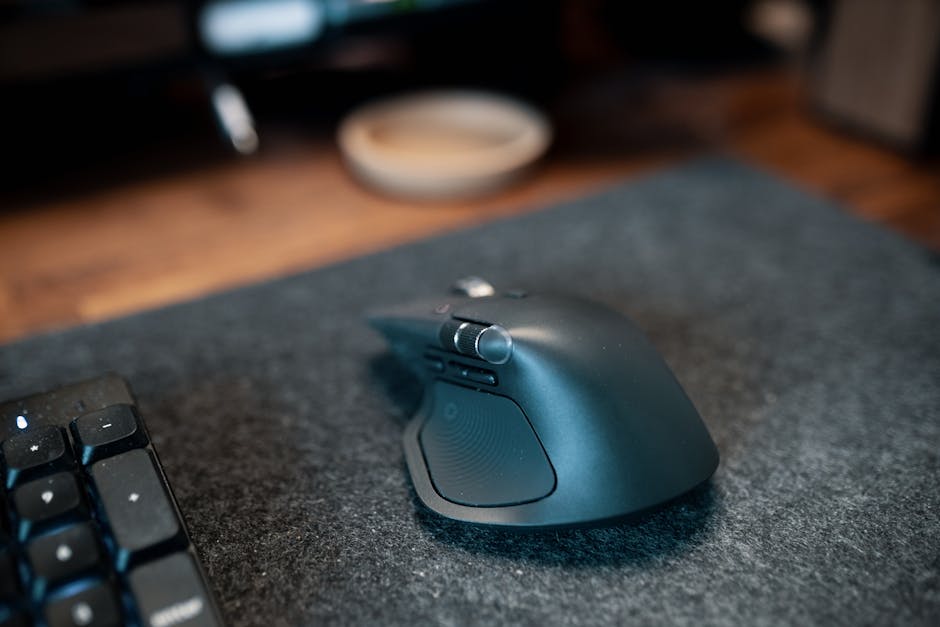
I never thought much about my mouse until the pain started. After my back injury in 2012, I spent years tracking down every source of discomfort at my desk. What I found surprised me: that innocuous little device next to my keyboard was creating a chain reaction of tension that traveled all the way up to my shoulder blades.
The traditional computer mouse forces your forearm to rotate inward by approximately 90 degrees, a position called pronation. This twist doesn’t just affect your wrist. It creates muscle tension that travels up through your shoulder and into your upper back, contributing to the chronic pain that plagues so many of us desk workers.
After researching and evaluating ergonomic solutions over the years, I can tell you that finding the right vertical mouse can dramatically reduce strain on your wrist, alleviate shoulder tension, and help improve your overall posture. The key is understanding what makes them work and which one fits your specific situation.
Key Takeaways
Vertical mice eliminate harmful forearm pronation, reducing wrist and shoulder strain by up to 78%
The natural handshake grip position decreases muscle tension throughout your arm and upper back
Switching requires a brief adjustment period, but most users adapt within 1-2 weeks
Proper vertical mouse setup combined with good desk ergonomics maximizes pain relief benefits
Vertical mice work best when paired with an ergonomic keyboard and proper monitor positioning
Why Traditional Mice Cause Pain: The Mechanics Behind Forearm Strain
When you place your hand on a conventional mouse, your forearm bones (the radius and ulna) cross over each other in what I learned is an unnatural twisted position. I didn’t realize this was happening until I started reading ergonomics research, but it explains a lot about the tension I was feeling.
This pronated position creates several problems at once. First, it compresses the soft tissues in your forearm, potentially restricting blood flow and nerve function. The muscles responsible for maintaining this twisted position (primarily your pronator teres and pronator quadratus) must work constantly. This leads to fatigue and tension that radiates upward into your shoulder and neck.
The flat mouse design also forces your wrist into ulnar deviation, where your hand bends sideways toward your pinky finger. This position compresses the carpal tunnel and can contribute to conditions like carpal tunnel syndrome and tendonitis. Ergonomists call the combination of pronation and ulnar deviation a “double crush” injury pattern.
The Upper Back Connection
Here’s what I found most interesting in my research: the effects of poor mouse ergonomics extend far beyond your wrist and forearm. When your arm is locked in that pronated position, your shoulder naturally rolls forward to accommodate the twisted posture. This forward shoulder position pulls on your upper trapezius muscles and creates tension in your thoracic spine (the middle section of your back).
Over time, this compensatory pattern leads to rounded shoulders, forward head posture, and chronic upper back pain. I spent two years in physical therapy before I realized that my mouse choice might be contributing to my tension headaches and neck stiffness.
How Vertical Mice Eliminate Strain and Improve Comfort
Vertical mouse designs work by rotating the traditional mouse orientation by approximately 90 degrees. This allows your hand to maintain what ergonomists call the “neutral handshake position.” The change is simple, but the biomechanical benefits are significant.
In the neutral handshake position, your forearm bones remain parallel rather than crossed. This eliminates compression on the soft tissues between them. Your wrist naturally aligns with your forearm, reducing pressure on the carpal tunnel and median nerve. Users consistently report immediate relief from the tension and pressure that builds up during long work sessions.
Biomechanical Benefits
Research in occupational ergonomics has shown that vertical mice can reduce muscle activity in the forearm by up to 78% compared to traditional mice. This reduction in muscle tension has a cascading effect throughout your upper body, allowing your shoulder to maintain a more natural position and reducing the compensatory patterns that lead to upper back pain.
The improved wrist alignment also enhances precision and control, since your hand operates in a more mechanically advantageous position. Tasks requiring fine motor control tend to become less fatiguing with a vertical mouse once you’ve cleared the adjustment period.
Top Vertical Mouse Options: Features and Comparisons
The vertical mouse market has expanded significantly as more people become aware of workplace injury prevention. While there are many options now, certain models have distinguished themselves through superior design, build quality, and user satisfaction rates.
Logitech MX Vertical
The Logitech MX Vertical represents mainstream adoption of vertical mouse technology by one of the industry’s leading peripheral manufacturers. This mouse features a 57-degree vertical angle that provides significant ergonomic benefits while remaining accessible to users transitioning from traditional mice.
Key features include a high-precision sensor that works on virtually any surface, customizable buttons for improved workflow efficiency, and a rechargeable battery that lasts up to four months on a single charge. The textured grip surface provides excellent control even during extended use sessions, and the build quality reflects Logitech’s reputation for durability. Independent reviews and long-term user reports consistently note reliability over multi-year use.
Evoluent VerticalMouse Series
Evoluent pioneered the vertical mouse concept and continues to offer some of the most ergonomically advanced options available. The VerticalMouse series comes in multiple sizes (small, regular, and large) to accommodate different hand sizes, ensuring optimal fit and comfort for every user.
The Evoluent design features a more aggressive vertical angle than many competitors, positioning your hand in an even more neutral posture. The button layout is specifically designed to minimize thumb strain, and the shape provides excellent palm support. Available in both wired and wireless configurations, these mice are particularly popular among users with existing repetitive strain injuries.
Factors to Consider When Choosing
Selecting the right vertical mouse for your specific needs requires considering several key factors. Hand size is crucial. A mouse that’s too large or small will create new pressure points and reduce the ergonomic benefits. Most manufacturers provide sizing guides based on hand measurements, and I recommend using them.
Your specific pain patterns should also influence your choice. If you have primarily wrist pain, you might benefit from a less aggressive vertical angle. If you have shoulder and upper back issues (like I did), you may prefer a more vertical design. The number and placement of buttons can also impact usability, especially if you rely heavily on mouse shortcuts in your daily work.
Making the Switch: A Step-by-Step Transition Guide
Transitioning to a vertical mouse requires patience and a strategic approach. I experienced an adjustment period as my muscle memory adapted to the new hand position and button layout. But with the right approach, this transition can be smooth and the benefits quickly apparent.
Start gradually: Begin by using your vertical mouse for 1-2 hours per day, gradually increasing usage as you become more comfortable with the new position.
Adjust your desk setup: Ensure your mouse pad provides adequate space for the different movement patterns required by a vertical mouse.
Customize button settings: Most vertical mice allow button customization. Set up shortcuts for your most common tasks to maximize efficiency.
Practice basic movements: Spend time in a simple drawing program practicing precise movements and clicks to build muscle memory.
Be patient with precision tasks: Complex tasks may take longer initially. Allow extra time for detailed work during your first weeks of use.
Monitor your comfort: Pay attention to how your wrist, shoulder, and upper back feel throughout the day. Improvement should be noticeable within the first week.
I found that basic navigation and clicking felt natural within 3-5 days, while complex tasks requiring precise mouse control normalized within about two weeks. The key is consistency. Don’t switch back and forth between your old and new mouse during the adjustment period.
Maximizing Benefits Through Complete Desk Ergonomics
While switching to a vertical mouse provided significant relief from my wrist and shoulder pain, I learned that the benefits are maximized when it’s part of a comprehensive ergonomic desk setup. Your mouse is just one component in the complex system of workplace ergonomics that affects your comfort and health.
Proper monitor positioning is crucial. Your screen should be at eye level to prevent the forward head posture that compounds upper back tension. An ergonomic keyboard that promotes neutral wrist positioning complements the benefits of your vertical mouse by ensuring both hands maintain optimal alignment during typing tasks.
Chair and Desk Height Considerations
Your chair height and armrest position significantly impact how effectively a vertical mouse can reduce strain. Your elbow should be positioned at approximately 90 degrees when using your mouse, with your upper arm hanging naturally at your side. If your desk is too high or your chair too low, you’ll create new tension patterns that can offset the benefits of improved mouse ergonomics.
I had to invest in an adjustable keyboard tray because my desk height couldn’t be modified. This allowed me to position my mouse and keyboard at the optimal height regardless of my desk’s fixed dimensions. Many ergonomic specialists recommend that your mouse should be positioned at the same height as your keyboard to maintain consistent arm positioning.
Long-term Health Benefits and Injury Prevention
The decision to switch to a vertical mouse is an investment in your long-term health and productivity. Repetitive strain injuries develop gradually over months and years of poor ergonomic practices, but they can also be prevented through proactive changes to your workspace setup.
After using vertical mice for several years now, I’ve noticed improvements that extend beyond immediate pain relief. Better sleep quality, reduced tension headaches, and improved focus throughout the workday are common secondary benefits that result from decreased chronic muscle tension.
The productivity benefits are equally significant. When you’re not constantly managing discomfort from wrist pain or shoulder tension, you can maintain focus for longer periods and work more efficiently. Many remote workers and frequent computer users find that the initial investment in a quality vertical mouse pays dividends in improved work quality and reduced fatigue.
Frequently Asked Questions
How long does it typically take to adjust to using a vertical mouse after switching from a traditional mouse?
Most users adapt to a vertical mouse within 1-2 weeks of regular use. The key is to transition gradually, starting with 1-2 hours per day and slowly increasing usage as your muscle memory adjusts to the new hand position and button layout. While there may be an initial learning curve, the ergonomic benefits quickly become apparent as your wrist and shoulder strain decreases.
Can a vertical mouse really help with upper back and shoulder pain, or does it only address wrist issues?
Vertical mice address pain throughout the entire upper body chain, not just the wrist. When you use a traditional mouse, the pronated forearm position causes your shoulder to roll forward, creating tension in your upper trapezius muscles and thoracic spine. By eliminating forearm pronation, vertical mice allow your shoulder to maintain a more natural position, reducing compensatory patterns that lead to upper back pain and tension headaches.
The Logitech MX Vertical features a 57-degree angle that balances ergonomic benefits with ease of transition, while the Evoluent VerticalMouse has a more aggressive vertical angle for maximum neutrality. Evoluent offers multiple sizes and focuses heavily on accommodating different hand sizes, whereas the MX Vertical emphasizes mainstream features like long battery life and high-precision sensors. Both effectively reduce strain, but Evoluent may be better for severe repetitive strain injuries.
Do I need to change other aspects of my desk setup when switching to a vertical mouse?
Yes, vertical mice work best when paired with proper desk ergonomics for maximum pain relief benefits. Ensure your mouse pad provides adequate space for the different movement patterns, and consider combining your vertical mouse with an ergonomic keyboard and proper monitor positioning. The mouse should be positioned at elbow height, and your overall workstation setup should support the improved posture that the vertical mouse enables.
How much can a vertical mouse actually reduce muscle strain compared to a regular mouse?
Research in occupational ergonomics shows that vertical mice can reduce muscle activity in the forearm by up to 78% compared to traditional mice. This dramatic reduction occurs because the neutral handshake position eliminates the need for your forearm bones to cross over each other, reducing compression on soft tissues and decreasing the constant muscle work required to maintain the pronated position of conventional mice.
The Bottom Line
Chronic wrist pain and shoulder tension from computer use don’t have to be inevitable consequences of desk work. The vertical mouse options available today offer a scientifically-backed solution that addresses the root biomechanical causes of repetitive strain injuries, not just the symptoms.
Whether you choose the user-friendly Logitech MX Vertical or the specialized Evoluent VerticalMouse series, the key is making the commitment to prioritize your long-term health over short-term convenience. The brief adjustment period required to adapt to vertical mouse use is insignificant compared to the years of pain and reduced productivity that can result from continued use of traditional mice.
Remember that an ergonomic mouse is most effective as part of a comprehensive approach to workspace wellness that includes proper seating, monitor positioning, and regular movement breaks. Your future self will thank you for taking action today to address these preventable sources of workplace injury.
Take the first step toward pain-free computer use by measuring your hand size and researching which vertical mouse model best fits your specific needs and work requirements.
Products Mentioned in This Article
As an Amazon Associate, I earn from qualifying purchases. These links help support the site at no extra cost to you.